· Flutter Deep Dives · 4 min read
permission_handler Android 13+ Storage Denied - Fix Flutter Permission Checks That Lie
Fix Flutter permission_handler flows that always return denied on Android 13+ by replacing legacy storage requests, reading request results, and routing users to settings only when needed.
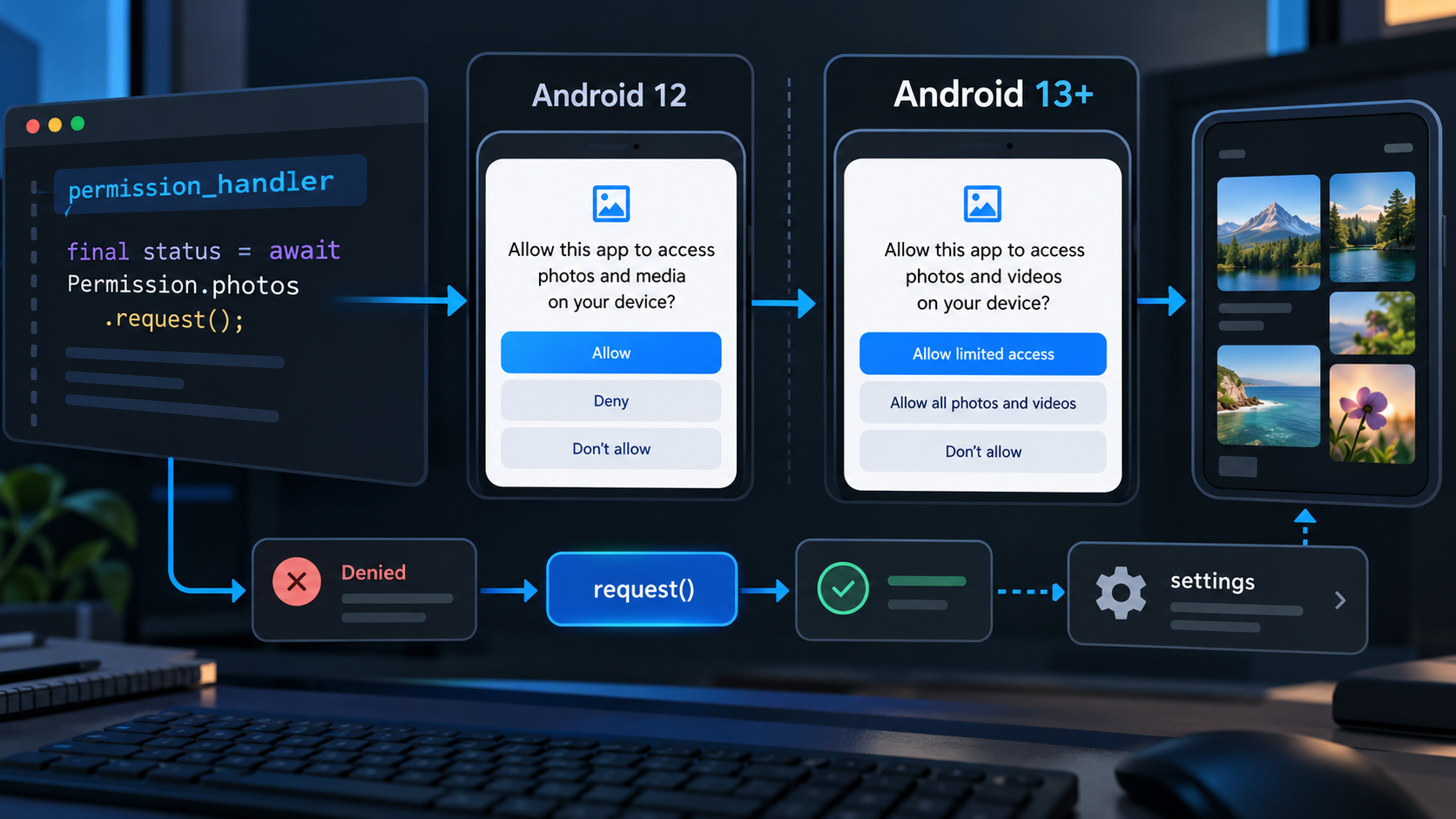
The production-safe choice is to stop requesting Permission.storage on Android 13+ and ask for the granular media permission that matches the file you actually use. This applies to Flutter apps using permission_handler on Android API 33 or newer; it does not mean every gallery flow needs a permission, because Android Photo Picker can grant a selected item without broad media access.
The confusing symptom is a request that returns denied forever, or a status check that never becomes permanentlyDenied. Those are two different problems: the old storage permission is disabled on newer Android versions, and Android does not expose permanent denial through a normal status read.
The two decisions that are easy to mix up
permission_handler currently documents that Permission.storage maps to READ_EXTERNAL_STORAGE and WRITE_EXTERNAL_STORAGE. Those permissions were deprecated from Android 10 and disabled from Android 13. For media, the replacement is Permission.photos, Permission.videos, or Permission.audio, with the app compiled against SDK 33 or higher.
| Situation | Correct action | Why |
|---|---|---|
| User selects one photo or video | Prefer Android Photo Picker or image_picker | No broad library permission is needed for a selected item |
| App scans existing photos | Request Permission.photos | Maps to Android’s granular media access |
| App indexes videos or audio | Request Permission.videos or Permission.audio | Ask only for the collection the feature reads |
Permission.status is denied | Call request() and inspect its result | Android can make “not asked” and “permanently denied” look identical |
The image shows the important boundary: a status read is not the final decision on Android. The result returned by request() is the point where the app can decide whether to show an explanation, continue, or open settings.
Replace the legacy request at the platform boundary
Keep the Android-version branch in one permission service instead of scattering checks through widgets. The following example is intentionally limited to media access; a camera feature should request Permission.camera separately.
import 'dart:io';

import 'package:permission_handler/permission_handler.dart';

Future<PermissionStatus> requestPhotoAccess() async {
  if (!Platform.isAndroid) {
    return Permission.photos.request();
  }

  // Android 13+ uses READ_MEDIA_IMAGES through Permission.photos.
  final status = await Permission.photos.request();

  if (status.isGranted || status.isLimited) {
    return status;
  }

  if (status.isPermanentlyDenied) {
    await openAppSettings();
  }

  return status;
}
There is a subtle reason not to write if (await Permission.photos.status.isPermanentlyDenied). On Android, status can report denied for a permission that has never been requested and for one that the user has blocked. Calling request() is cheap in the blocked case: the OS returns immediately without showing a dialog, and the returned value can be permanentlyDenied.
If the feature only needs a user-selected file, remove the permission request entirely. With image_picker, the Android Photo Picker path is usually a better privacy and maintenance boundary than asking for the whole media library. A permission is justified when the product must scan, sync, or repeatedly read media that the user did not select in the current action.
Manifest and SDK checks
The Dart code cannot compensate for an incomplete native configuration. Before testing a release build, check these three items:
[ ] compileSdkVersion is at least 33 for Android 13 media permissions
[ ] AndroidManifest declares only the media permissions the feature needs
[ ] the app does not still gate Android 13+ behavior on Permission.storage
Also test the feature on a clean install and on an upgrade from an older version. A previously granted broad storage permission can produce a misleading result on one device, while a clean Android 13 install exposes the real request path.
A small test matrix catches the regression
This is a decision test, not a benchmark. The important assertion is that the UI follows the returned status rather than a cached pre-request value.
| Device state | Expected status read | Expected request() branch |
|---|---|---|
| Fresh install | denied | Show the system prompt, then continue or explain |
| User rejects once | denied | Explain the feature and allow a later retry |
| User blocks future prompts | Often still denied before request | Open settings after request() returns permanentlyDenied |
| User grants selected media | granted or limited | Read only the media scope the feature supports |
Do not label every denied response as “go to Settings”. That creates a dead-end on the first request. Conversely, do not retry indefinitely after request() returns permanentlyDenied; give the user a settings action and a way to continue without the feature.
The official permission_handler documentation describes the Android 13 storage change and the request-driven permanent-denial behavior. Android’s runtime permission guidance covers the rationale and request sequence. The package’s current changelog also records the recent Android status behavior clarification.