· Flutter Deep Dives · 5 min read
flutter_native_splash Android 12 Launch - Fix the Missing Splash Screen Without Chasing the Wrong Bug
Why flutter_native_splash behaves differently on Android 12, Android Studio, launchers, and notification taps, with a reproducible configuration and verification checklist.
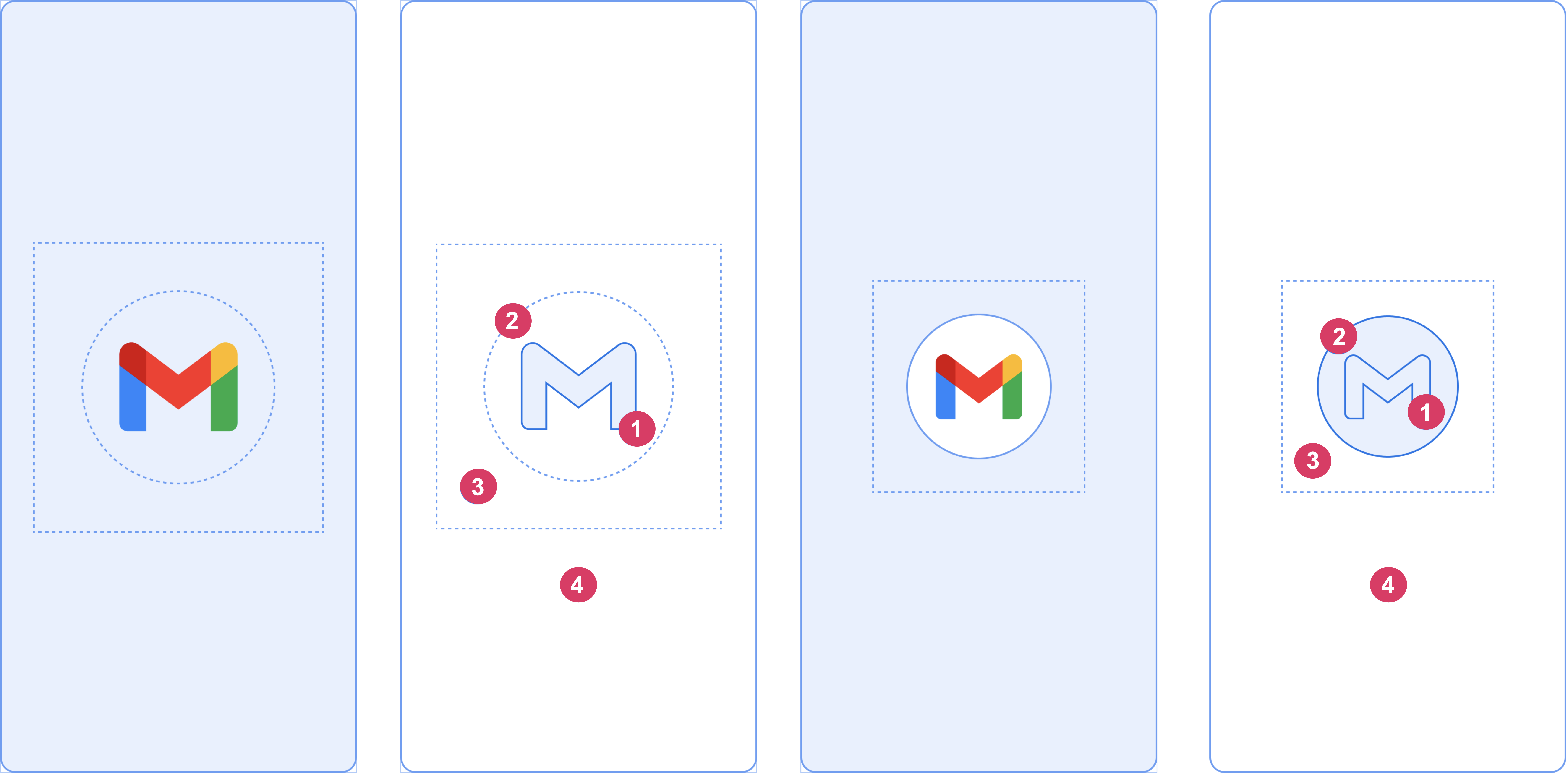
The production fix for a Flutter splash screen that appears on Android 11 but seems missing on Android 12+ is to separate three cases: the generated Android 12 configuration, the way the app was launched, and the launcher being used. flutter_native_splash does not turn an Android 12 icon into a full-screen background image. This guide fits apps that use flutter_native_splash for a static native launch screen; it does not apply to an in-app loading page or to a notification flow that intentionally bypasses the normal launcher animation.
The failure is often a test mismatch
Android 12 introduced the SplashScreen API. Its composition is a solid window background, a centered icon, and an optional icon background. The old Android configuration and the android_12 configuration are separate inputs. A large background image that worked on Android 11 is not a valid expectation for the Android 12 surface.
The package documentation also records three easy-to-misread behaviors:
| Test path | What can happen | Correct interpretation |
|---|---|---|
| Android Studio launch on API 31 | Splash may not appear | Use the device launcher for a real cold-start check |
| Non-Google launcher | Icon or image can look wrong | Compare with the Google launcher before changing assets |
| Cold launch from a notification | Splash icon may not appear | This is documented Android 12 behavior, not proof that generation failed |
The same APK can therefore look “fixed” or “broken” depending on the entry point. A hot restart is not a splash-screen test because the native window has already been passed.
Keep the two configuration boundaries explicit
The package generates native resources from YAML. The general settings cover platforms before Android 12, while android_12 controls the Android 12+ icon surface. Put the Android 12 values in the file even when the general values look correct.
Before running the generator, use a small configuration that makes the platform difference visible:
flutter_native_splash:
  color: "#F7F8FA"
  image: assets/brand/splash-legacy.png

  android_12:
    color: "#F7F8FA"
    image: assets/brand/splash-android12.png
    icon_background_color: "#FFFFFF"
The android_12.image is treated as a centered icon and is clipped to a circle. The package documentation gives different safe artwork areas depending on whether the source icon has a background: roughly 768 px inside a 1,152 px image without a background, or 640 px inside a 960 px image with one. Keep the logo and any text inside that safe circle. A wide wordmark is a poor Android 12 splash asset even if it looks correct in a legacy full-screen layout.
Generate the resources from the project root:
dart run flutter_native_splash:createIf the configuration lives outside pubspec.yaml, pass its path explicitly:
dart run flutter_native_splash:create --path=tool/splash/flutter_native_splash.yamlFor a flavor build, use the package’s flavor naming convention rather than generating one file and assuming every variant inherited it:
flutter_native_splash-production.yaml
flutter_native_splash-staging.yaml
flutter_native_splash-development.yaml
The generated files are build inputs. Treat the YAML and the generator command as part of the release recipe, then inspect the Android resources in the resulting commit when a flavor has a different logo or background.
Do not hold the native splash forever
By default, the generated native splash is removed after Flutter draws its first frame. That is usually the safest behavior. If the app needs to finish a short bootstrap before showing its first route, preserve the native window deliberately and remove it from the same initialization state machine.
The code below is appropriate for initialization that has a clear completion or failure state. It is a bad fit for an app that can wait indefinitely for a network request.
import 'package:flutter/widgets.dart';
import 'package:flutter_native_splash/flutter_native_splash.dart';

Future<void> main() async {
  final binding = WidgetsFlutterBinding.ensureInitialized();
  FlutterNativeSplash.preserve(widgetsBinding: binding);

  Object? bootstrapError;
  try {
    await bootstrapLocalState();
  } catch (error) {
    bootstrapError = error;
  } finally {
    FlutterNativeSplash.remove();
  }

  runApp(App(bootstrapError: bootstrapError));
}
If bootstrapLocalState() can fail, the catch plus finally path prevents a permanent native-looking blank screen while passing the failure into Flutter. The failure UI belongs there, where it can show retry and offline actions. A timeout is also useful for remote configuration; a splash screen should not become an invisible outage screen.
A reproducible verification matrix
The package documentation and the official Flutter Android splash sample describe the platform rules, but neither replaces a release-path check. Use a real installed build and record the result for each row:
| Check | Setup | Expected observation |
|---|---|---|
| Legacy Android | API 30 or lower, cold launch from launcher | General color and image are used |
| Android 12 normal launch | API 31+, terminate app, tap launcher icon | android_12.color and centered icon appear |
| API 31 tooling check | Start from Android Studio | Treat a missing splash as an inconclusive tooling path |
| Notification entry | Terminate app, tap a notification | Do not require the Android 12 splash icon |
| Flavor output | Install production and staging APKs separately | Each APK shows its intended generated asset |
| Initialization delay | Add a bounded artificial delay | Native splash remains only until the bootstrap finishes |
To reproduce the confusing API 31 case, compare two launches of the same installed APK: the Run button in Android Studio and the launcher icon on the device. If only the first path omits the splash, changing the asset or adding a second manifest theme is likely unrelated work.
Common fixes that make the problem worse
- Adding a large
background_imageunderandroid_12. Android 12 uses a single opaque color plus an icon surface; the legacy background image does not carry over. - Testing only with hot reload. The native splash is outside the Dart widget tree and is evaluated before Flutter code runs.
- Calling
preserve()without a guaranteedremove(). This turns a slow API or failed config request into a startup hang. - Treating a notification tap as a normal launcher tap. Android 12 can intentionally omit the splash icon for that route.
- Regenerating only the default flavor. A release build can still contain stale resources if its flavor YAML was never generated.
The practical checklist is short: define android_12, use a circular-safe icon, run the generator from the intended project or flavor, perform a cold launcher launch on API 31+, and test notification entry separately. Keep the splash duration bounded and move retryable failures into the Flutter UI.
Sources checked on 2026-11-04: flutter_native_splash package documentation, Flutter’s Android splash screen sample, and Android 12 splash screen guidance.